

From Booking to Door: How the Wieldy × Bear & Me System Works


In our previous article, we explained how Wieldy and Bear & Me divide their roles.
Wieldy connects the booking to the access credential, while Bear & Me connects that credential to the physical door.
Now, let us look at what the process can actually look like in practice.
Having a basic understanding of the journey—from booking to access—can make the next conversation much clearer when considering a system for your own property.
The exact setup will depend on the PMS, doors and daily operation of each hotel, guesthouse or serviced accommodation, but the general process can be surprisingly straightforward.
Step 1: The Guest Makes a Booking
The guest books through the property’s usual booking channel.
The reservation enters the Property Management System, or PMS, with details such as the guest’s name, room, arrival date and checkout date.
Once the PMS and Wieldy are connected, the booking information can trigger the next stages automatically, rather than requiring staff to create and send every access code manually.
Step 2: A Temporary Access Credential Is Created
Wieldy uses the booking details to generate a temporary access credential for the guest.
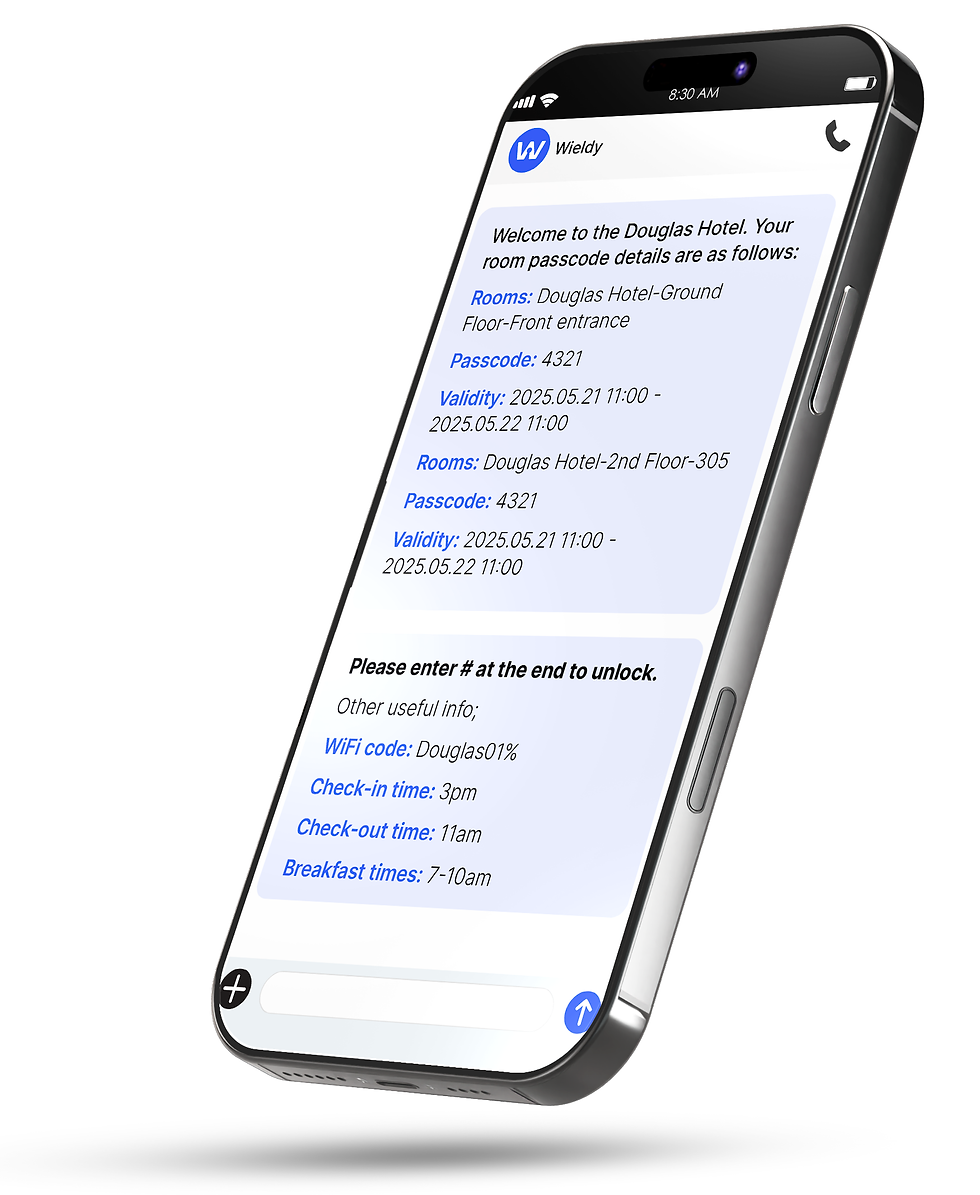
Depending on the property’s chosen setup, this may be:
a unique four-digit PIN; or
a secure webkey accessed through the Wieldy Guest Web App.
The guest web app does not require a download. The guest receives a secure link by SMS and email and opens it directly on their smartphone.
The credential is linked to the correct booking period and authorised doors.
This means access can be set around where the guest is actually allowed to go, rather than simply giving unrestricted access to the entire property.
Step 3: Access Details Are Sent Before Arrival
The guest’s access information can be scheduled for automatic delivery, for example 24 or 48 hours before arrival.
The property may also apply specific conditions before the access details are released.
For example, the credential can be sent only after the reservation has been paid in full. If payment is still outstanding, the guest may be asked to complete it online or at reception before receiving access.
The information is sent by SMS and email, helping reduce the chance that important check-in details are missed.
Multilingual messaging options are also available for international guests.

Step 4: One Credential Can Open the Correct Doors
When the guest arrives, the same PIN or webkey can be used across several authorised access points.
For example, one credential may provide access to:
the main entrance;
the guest’s assigned room;
a gym;
or another shared facility included in the stay.
From the guest’s point of view, the process is simple.
They receive their access details, arrive and enter the areas included in their booking.
They do not need to collect a physical key, search for a key box or wait for someone to meet them at the property.
Behind that simple experience, the PMS, Wieldy platform and smart access hardware are working together.
Step 5: The Property Retains Oversight
Automation does not mean losing control.
Through the Wieldy management portal, authorised staff can oversee reservations, scheduled passcodes, guest notifications and relevant access activity.
They can also manage situations that do not follow the normal process.
For example, staff may need to:
resend access details;
update incorrect guest information;
generate access manually;
adjust an access period;
or manage a room change.
The system handles repetitive tasks, while the property retains the ability to step in when necessary.

Step 6: Access Expires After Checkout
At the end of the booking period, the guest’s PIN or webkey automatically expires. The next guest receives a different credential.
This gives the property more control than relying entirely on physical keys or reusable keycards that may be lost, copied or kept after checkout.
RFID cards and physical backup keys can still remain available where appropriate.
Keyless access does not have to mean removing every existing access method. The right setup may combine digital access with suitable backup options.
Managing Staff Access
Guests are not the only people who need access to a property.
Managers, reception staff, cleaners, maintenance teams, suppliers and external contractors may all require different levels of entry.
A smart access system can provide separate credentials and permissions for different users.
For example:
a cleaner may have access to selected rooms during working hours;
a manager may have access to guest rooms and shared areas;
a maintenance contractor may receive temporary access to one room;
and a supplier may only be authorised to use a specific entrance.
Access can be limited by door, date and time according to each person’s role.
Entry records can also provide a clearer view of when a credential was used.
This gives the property more information and control than relying on shared physical keys that may be passed between several people.
Access Beyond the Guest Room
The system does not have to stop at the bedroom door.
Depending on the property, access can also be managed for:
the main building entrance;
shared facilities;
gyms and leisure areas;
staff-only spaces;
storage rooms;
offices;
and service entrances.
One credential can provide access to several authorised doors while keeping other areas restricted.
This allows the property to manage access across the building instead of treating every door as a separate problem.
What Happens When Something Changes?
Hotel operations do not always follow a perfect routine.
A guest may change rooms, extend their stay or miss the original access message. A contractor may need urgent entry, or an employee’s permissions may need to be adjusted.
Authorised staff can manage these exceptions, resend information and update credentials when required.
Automation handles the usual journey, while the property remains in control when circumstances change.
What Does Bear & Me Do?
The automated process only works properly when the physical access system has been planned and configured correctly.
Bear & Me assesses the property and recommends suitable smart locks and access equipment based on factors such as:
the existing lock and cylinder;
the construction and condition of the door;
the entrance layout;
the number of rooms and shared doors;
gateway and connectivity requirements;
backup access options;
staff workflow;
and the property’s existing PMS.
We then oversee the physical setup, configure and test the system, and make sure each credential works on the correct doors.
Not every smart lock is suitable for every door or commercial environment.
The goal is not simply to add a keypad.
The goal is to create a reliable access system that fits the way the property actually operates.
Who Supports What?
Wieldy supports the PMS integration, automated credentials, guest messaging and digital management platform.
Bear & Me supports the smart locks, gateways, physical setup and door configuration.
This clear division helps the property understand who is responsible for each part of the system.
Could This Work for Your Property?
The journey described above provides a general overview, but every property has different doors, systems and operational requirements.
The correct setup depends on the PMS already in use, the number and type of doors, the areas guests and staff need to access, and the way entry is currently managed.
Having a basic understanding of the process makes the next conversation clearer.
From there, Bear & Me and Wieldy can review the property’s actual requirements and explain which options may be suitable.
Contact Bear & Me to discuss how an integrated Wieldy smart access solution could work for your hotel, guesthouse or serviced accommodation.


Comments