

How Restaurants Can Manage Staff Access with TTLock (Without Physical Keys)


Running a restaurant is already demanding.
Whether it's a busy restaurant on Oliver Plunkett Street or a cosy café near the English Market, restaurant owners and managers are constantly juggling staff schedules, deliveries, and daily operations.
But there’s one small operational issue many restaurants still deal with every day:
managing physical keys.
Who has the key today?
Did the last staff member return it?
What happens when someone leaves the job?
In a fast-moving hospitality environment, something as simple as a key can quickly become an operational headache.
This is where smart access systems like TTLock can make a surprisingly practical difference.
Here are a few simple ways restaurants can manage staff access more efficiently.
1️⃣ Create PIN Codes for Staff Instead of Sharing Keys
With TTLock, each staff member can be given their own personal PIN code.
For example:
Chef
Waiter
Manager
Instead of passing around a single key, every staff member simply enters their code.
This removes a common problem in restaurants:
• Lost keys
• Staff forgetting to return keys
• Multiple copies of the same key circulating
Access becomes personal and traceable, rather than anonymous.
Example: Creating PIN Codes for Restaurant Staff in TTLock
Instead of sharing one key among the team, a restaurant can create individual access codes for each role.
Below is a simple example of how this might work in a typical restaurant.
👨🍳 Chef – Early Access Code
Chefs often arrive earlier than the rest of the team to begin food preparation.
In TTLock, you can create a time-limited PIN code that only works during the chef’s workin
g hours.
Example:
Name: Chef Access Time: 06:00 – 16:00 Type: Recurring
This allows the chef to enter the restaurant early in the morning without needing a physical key.

🍽 Waiter – Shift-Based Access
Waiters usually work in shifts and don’t need full-day access.
Example:
Name: Waiter – Lunch Shift
Access Time: 11:00 – 17:00
Type: Recurring
The code will only work during those hours, helping prevent late-night or off-hour access.

👨💼 Manager – Permanent Access
Managers usually need full-time access to the premises.
Example:
Name: Manager
Access: Permanent
This code will work anytime and doesn’t expire.

Why This Works Better Than Keys
With this setup:
• Staff no longer need to carry keys
• Access can be adjusted anytime in the app
• Codes can be deleted instantly if staff leave
Everything is managed directly from the TTLock mobile app.
In some kitchens, 👆fingerprint access is also used for key staff such as the head chef or manager.
When hands are full or service is busy, unlocking the door with a quick fingerprint can be faster than entering a code.
2️⃣ Set Time-Limited Access for Cleaners or Suppliers
Restaurants often have people entering the premises outside normal operating hours.
For example:
Cleaning staff after closing or before opening
Early morning suppliers delivering ingredients
Instead of handing out a physical key, TTLock allows you to create time-limited PIN codes.
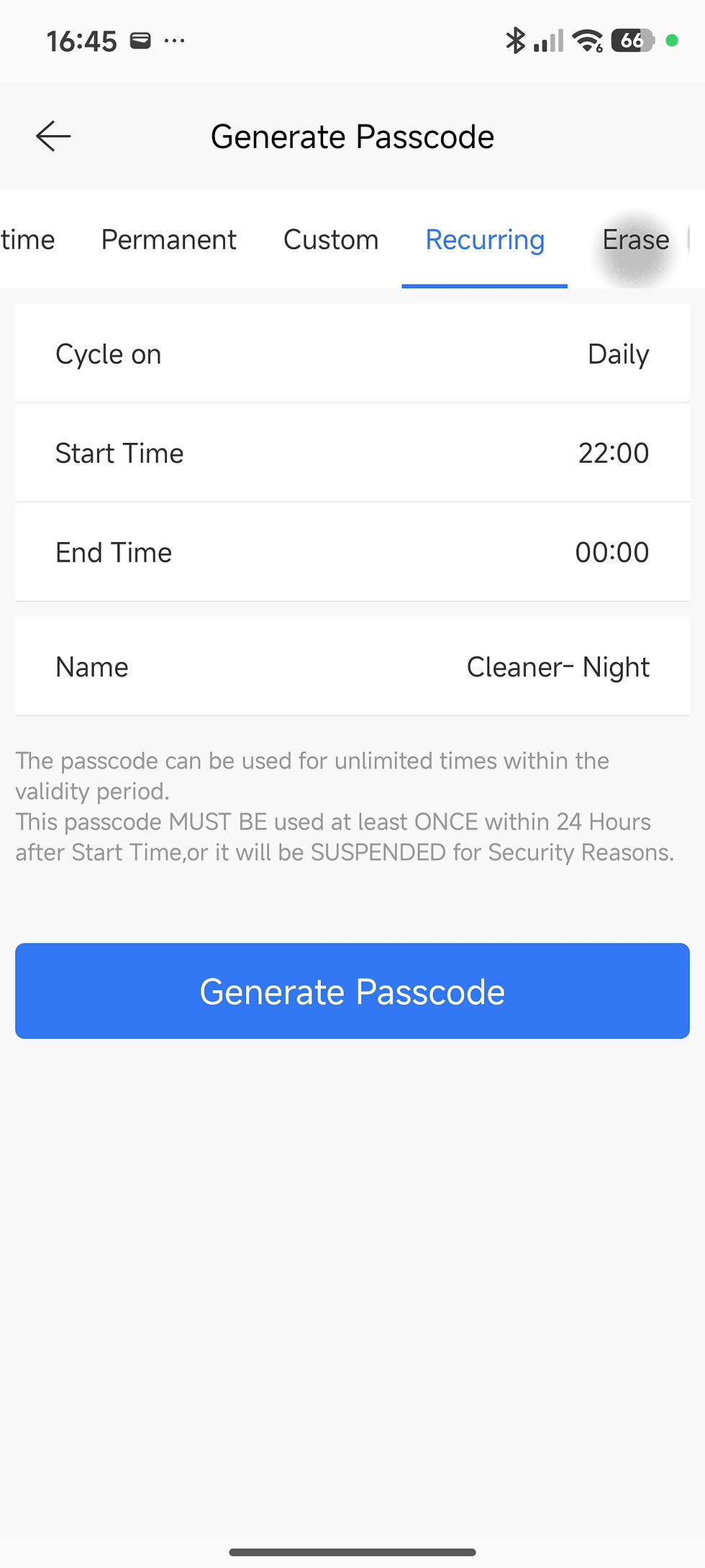
🧹 Cleaner – Night Access
Cleaner – Night
Access Time: 22:00 – 00:00
Type: Recurring
🚚 Supplier – One-Time Delivery Access
Suppliers don’t always arrive at the same time every day.
Instead of giving them a permanent key, restaurant owners can generate a one-time access code.
Supplier – Delivery
Access Type: One-Time Passcode
Valid Time: 05:30 – 06:30
Once used, the code expires automatically.

3️⃣ Remove Access Instantly When Staff Leave
Restaurant teams change frequently.
New staff join.
Others move on to different jobs.
With traditional key systems, this creates a frustrating question:
Do you ask for the key back and hope it’s returned?
Or do you replace the lock — just in case copies were made?
With TTLock, access can be removed in seconds.
Simply open the app and delete the staff member’s PIN code.
The code stops working immediately.
No locksmith, lock replacement and uncertainty.
Example: Removing Staff Access
Step 1→Open the lock in the TTLock app.
Step 2→Tap Passcodes to see the list of access codes.
Step 3 →Select the staff member’s code.
Step 4→Tap Delete.
The code stops working immediately.

4️⃣ Check Access Records Anytime
Another useful feature in TTLock is the access log.
Restaurant owners can check:
Who unlocked the door
What time it happened
Which door was accessed
For businesses with multiple entry points — such as:
staff entrances
storage rooms
office doors
back delivery doors
this visibility can be surprisingly helpful.
Managers can confirm when staff arrived for their shift or check who accessed a specific door during the day.
If something unusual happens — such as a missing item or an unlocked door — the access record provides a clear timeline.
It’s not about monitoring staff.
It’s simply about having better operational clarity in a busy environment.
Example: Viewing Access Records
Step 1→Open the lock in the TTLock app.
Step 2→Tap Unlock Records.
Step 3→View the timeline of entries.

Which Restaurant Doors Benefit Most from This Setup?
Restaurants often have several entry points, but not every door needs the same level of access control.
In many cases, owners start by upgrading just one or two doors
where key management creates the most friction.
Some common examples include:
Staff Entrance - Where employees arrive for their shifts.
Back Delivery Door - Used by suppliers delivering ingredients early in the morning or there is no one on site.
Storage or Stock Room - Where alcohol, ingredients, or expensive equipment are stored.
Office Door - Where cash and administrative work are handled.
Even upgrading just one of these doors can significantly simplify daily operations.
Instead of tracking physical keys, restaurant owners can manage access directly from their phone.
Restaurants change staff frequently.
But the lock shouldn’t need to change every time.
How do you currently manage access in your restaurant?
Are keys still being passed between staff members — or have you already started using smart access?
We’d love to hear how other restaurants handle this challenge.
If you’re curious about how smart locks could work in your space, feel free to explore more guides on our website or start a conversation with us.


Comments