

What Is Passage Mode in TTLock Smart Locks — And When Should You Use It?

Today I want to share a small feature that many people don’t know about —
but it’s surprisingly useful: Passage Mode

Sometimes, your door doesn’t need to be locked all the time.
When people are constantly coming in and out,unlocking it every time just gets annoying.
That’s where Passage Mode comes in.
So what is it?
✍️ What is Passage Mode?
Passage Mode means your door stays unlocked for a period of time,so people can come and go freely—without needing to unlock it every time.
It’s especially useful when there’s a lot of movement through the door.
Why Passage Mode Became Essential for Me
At some point…I just leave the door unlocked.
There are moments when locking and unlocking the door over and over againjust doesn’t make sense anymore.
Think about:
Customers walking in and out
Deliveries arriving throughout the day
Carrying things back and forth
After the third or fourth time opening the door,you start thinking…
“Why am I doing this again?”
And that’s usually when people do the same thing:
They leave the door unlocked.
But that never feels quite right either.
Passage Mode solves this perfectly.
It gives you the flexibility to keep the door open when you need it—without losing control of your security.
And when things calm down?
🎯Just switch it off
🎯And everything goes back to normal
🛠️ How to Set Up Passage Mode on TTLock
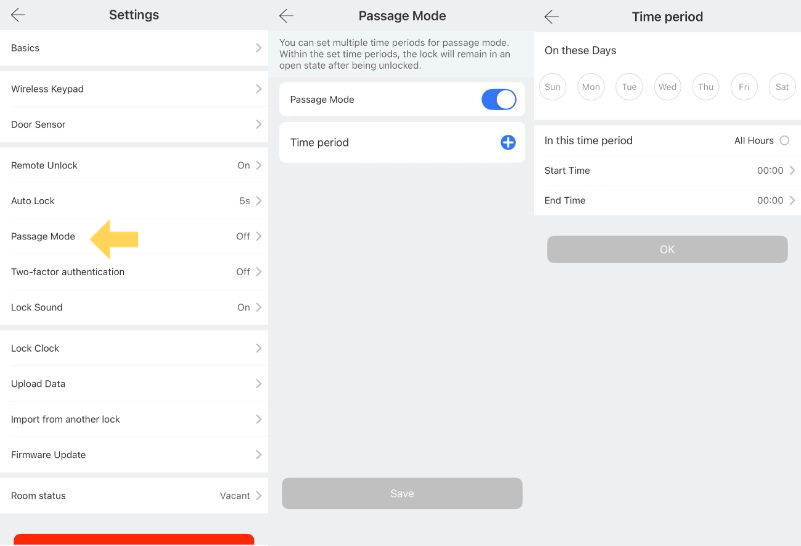
1️⃣Go to “Settings” on the main page and find “Passage Mode”,
then turn it on.
2️⃣To schedule when Passage Mode is active:
Click the “+” icon to add a time period.
3️⃣Select the days and time you want, then tap “OK” to confirm.
You can set up to 5 different time periods,depending on your daily routine or business hours.
⚠️ One small thing to note:
Passage Mode doesn’t activate automatically right away.
👉 The first unlock needs to be done by an authorised user (fingerprint, passcode, app remote control or card).
We’ve had a few customers ask why it wasn’t working at first —
and this was the reason.
Once the first unlock is done, everything works as expected.
⚠️This is mainly for security.
Passage Mode only activates after an authorised unlock —whether it’s via app, fingerprint, passcode, or card.
This makes sure the door doesn’t switch to “always open”without someone actually triggering it.
It’s a small detail — but one that makes a big difference in how secure the system is.
Real-Life Use: When Do I Actually Use It?
I’ve found myself using Passage Mode more often than I expected.
Sometimes it’s something simple —like hosting a home party,where people keep arriving and the doorbell doesn’t stop.
But more often, it’s during everyday moments:
Busy work hours
Receiving multiple deliveries
Moving things in and out of the house
It removes that constant interruption of unlocking the door,and makes everything flow more naturally.
FAQs
Can I turn Passage Mode on and off anytime?
Yes, you can activate or deactivate it directly in the app whenever needed.
Is it safe to use?
Yes—when used properly.
It’s designed for controlled situations where frequent access is needed.
Does it affect battery life?
No, it has minimal impact on battery usage.
Some features aren’t about security alone—they’re about making everyday life smoother.
Passage Mode is one of them.
Simple idea and big difference in the right moment.


Comments