

What Is TTLock? A Simple Guide for Smart Lock Beginners

Understanding the app system behind many smart locks — and why it matters before choosing one.
If you’ve been looking at smart locks, you may have seen names like TTLock, Tuya, Smart Life, Bluetooth, Wi-Fi Gateway… and thought:
“Wait… am I buying a lock, an app, or a small spaceship?”
Don’t worry. You’re definitely not the only one.
Recently, I helped a few clients set up the TTLock app on their phones.
When I told them, “We’ll use TTLock to control the lock,” their faces basically said it all:
“Sorry… what is TTLock?”
And honestly? I completely understand.
When I first started learning about smart locks, I had the same questions.
Was TTLock the lock brand? Was it the app? Did every smart lock need it? And why did one simple door lock suddenly come with so many new words?
The funny thing is, once you start using it, TTLock is actually quite simple. It just sounds confusing at the beginning because most people have never heard the name before.
So in this article, let’s start from zero.
No complicated technical talk.
No confusing smart home jargon.
Just a simple explanation of what TTLock is, what it does, and why you may see this name when choosing a smart lock.

What Is TTLock?
TTLock is not the lock itself. It is the app and software system that helps you control and manage compatible smart locks from your phone.
A simple way to understand it is this:
The smart lock is the hardware on your door.TTLock is the remote control, digital keyring, and access manager inside your phone.
Think of it like your TV remote control.
The TV is the device, but the remote is what makes it easy to use. In the same way, the smart lock is installed on your door, but TTLock is the app that helps you control it.
Or imagine your old keyring — house key, office key, back door key, spare key for someone else. TTLock is like turning that keyring into a digital version on your phone.
Instead of cutting new keys or worrying about lost keys, you can create passcodes, share access, remove users and manage who can enter.
For BNB hosts or small business owners, TTLock can feel like having a small reception desk in your phone. You can create a temporary passcode for a guest, give staff access during working hours, or remove access when someone no longer needs it.
So when we say, “We’ll use TTLock to control the lock,” we simply mean:
TTLock is the app that helps you manage how people unlock the door.
That’s it. Not a spaceship. Just a very useful little system behind the smart lock.
Where does TTLock come from?
TTLock is not just a random app name that suddenly appears when you buy a smart lock.
It was developed as part of a smart lock solution platform connected with Hangzhou Sciener Smart Technology.
The idea is quite simple: instead of every smart lock brand building its own app and management system from zero, TTLock provides the software system that many compatible locks can use.
A good way to understand it is to think about smartphones.
You may buy a Samsung, Xiaomi or Motorola phone, but many of them use Android as the operating system. Android is not the phone itself — it is the system that helps the phone work.
TTLock works in a similar way for smart locks.
The lock on your door is the hardware.
TTLock is the system that helps you manage it from your phone.
That is why you may see different lock designs, different brands, and different models all using the same TTLock app. The outside of the lock may look different, but the system behind it can be TTLock.
And that is also why learning TTLock is useful.
Once you understand the app, it becomes much easier to manage compatible locks — whether it is for your home, a BNB, an office, or a small business.
So, what can you actually do with TTLock?
as I mentioned,
If the smart lock is like your TV, then TTLock is like the remote control.
The lock sits on your door, doing the physical job of locking and unlocking. But when you want to control the smart features, you open the TTLock app.
Want to create a passcode?
Use TTLock.
Want to share access with a family member, guest, cleaner or staff member?Use TTLock.
Want to set when someone can enter, or remove their access later?
Use TTLock.
Want to check who opened the door and when?
That is also where TTLock comes in.
To make it less abstract, here’s a quick look at what the TTLock app actually looks like:
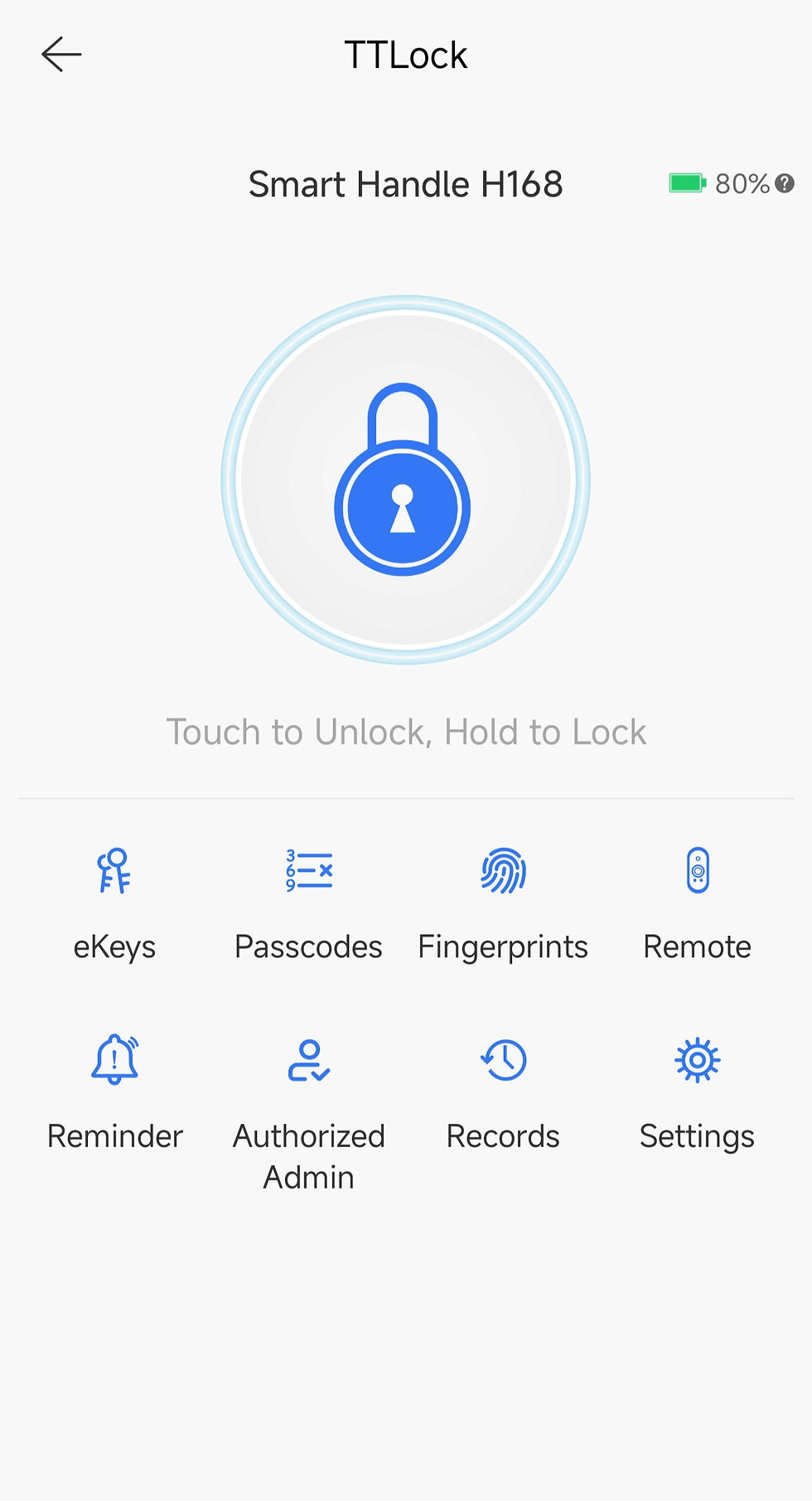
As you can see, this is where you can manage features such as eKeys, passcodes, cards, fingerprints, records and settings.
In other words, this is where the “smart” part of the smart lock becomes practical in everyday use.
This is why TTLock is more than just an “open the door” app. It is the place where you manage the whole access experience.
A traditional key is simple, but it is also very limited.
Once someone has a key, you cannot control when they use it.
And if they lose it, you may need to change the cylinder or worry about who might still have access.
With TTLock, access becomes more flexible. You can create a temporary passcode for a guest, give regular access to staff, set time limits, or delete access when it is no longer needed.
For example, you can give your family permanent access, send a one-time passcode to a visitor, allow a cleaner to enter only during certain hours, or remove a staff member’s access when they no longer work with you.
It can also help you understand what is happening at the door.
Depending on your lock model and setup, you may be able to see access records, check which passcode was used, or confirm whether someone has entered.
For one smart lock at home, this is already convenient.
But for a BNB, office, clinic, rental property or small business, this becomes even more useful because you are not just opening a door — you are managing who can enter and when.
For one lock, TTLock is convenient.For several locks, it becomes much more powerful.
This is where TTLock starts to feel less like a simple app, and more like a small access management system in your pocket.

Do you always need Wi-Fi or a gateway?
Not always.
Many TTLock smart locks can work through Bluetooth when you are close to the door. This means you can use the app to unlock or manage the lock when you are nearby.
However, if you want to unlock the door while you are away, check access records remotely, or manage the lock from another location, you may need a compatible gateway.
Think of the gateway as a small bridge between your lock and the internet.
But don’t worry — we’ll keep that topic for another article, because Bluetooth, Wi-Fi and Gateway deserve their own simple explanation.
For now, the main thing to remember is this:
TTLock is the app system that helps you manage your smart lock. A gateway is an extra device that can help you manage it remotely.
If you already have a TTLock smart lock and want to see how access sharing works in real life, I’ve also written a simple guide on how to grant access to another person using TTLock.
In that article, I explain how to share access through the app, such as giving someone a temporary passcode or digital key, depending on your lock model and setup.
read the article here: 🔐 How to Share Access with Others Using TTLock (Without Losing Your Mind)

Comments